Quick Response Code

QR code (abbreviated from Quick Response Code) is the trademark for a type of matrix barcode (or two-dimensional barcode) first designed for the automotive industry in Japan; a barcode is an optically machine-readable label that is attached to an item and that records information related to that item: The information encoded by a QR code […]

QR code (abbreviated from Quick Response Code) is the trademark for a type of matrix barcode (or two-dimensional barcode) first designed for the automotive industry in Japan; a barcode is an optically machine-readable label that is attached to an item and that records information related to that item: The information encoded by a QR code may be made up of four standardized types (“modes”) of data (numeric, alphanumeric, byte / binary, Kanji) or, through supported extensions, virtually any type of data.[1]

The QR Code system has become popular outside the automotive industry due to its fast readability and greater storage capacity compared to standard UPC barcodes. Applications include product tracking, item identification, time tracking, document management, general marketing, and much more.[2]

A QR code consists of black modules (square dots) arranged in a square grid on a white background, which can be read by an imaging device (such as a camera) and processed using Reed-Solomon error correction until the image can be appropriately interpreted; data is then extracted from patterns present in both horizontal and vertical components of the image.[2]


PHP QR Code is open source (LGPL) library for generating QR Code, 2-dimensional barcode. Based on libqrencode C library, provides API for creating QR Code barcode images (PNG, JPEG thanks to GD2). Implemented purely in PHP, with no external dependencies (except GD2 if needed).

Some of library features includes:

  • Supports QR Code versions (size) 1-40
  • Numeric, Alphanumeric, 8-bit and Kanji encoding. (Kanji encoding was not fully tested, if you are japan-encoding enabled you can contribute by verifing it :) )
  • Implemented purely in PHP, no external dependencies except GD2
  • Exports to PNG, JPEG images, also exports as bit-table
  • TCPDF 2-D barcode API integration
  • Easy to configure
  • Data cache for calculation speed-up
  • Provided merge tool helps deploy library as a one big dependency-less file, simple to “include and do not wory”
  • Debug data dump, error logging, time benchmarking
  • API documentation
  • Detailed examples
  • 100% Open Source, LGPL Licensed

The Eric Python IDE

Eric is a full featured Python and Ruby editor and IDE, written in python. It is based on the cross platform Qt gui toolkit, integrating the highly flexible Scintilla editor control. It is designed to be usable as everdays’ quick and dirty editor as well as being usable as a professional project management tool integrating […]

Eric is a full featured Python and Ruby editor and IDE, written in python. It is based on the cross platform Qt gui toolkit, integrating the highly flexible Scintilla editor control. It is designed to be usable as everdays’ quick and dirty editor as well as being usable as a professional project management tool integrating many advanced features Python offers the professional coder. eric4 includes a plugin system, which allows easy extension of the IDE functionality with plugins downloadable from the net.

Current stable versions are eric4 based on Qt4 and Python 2 and eric5 based on Python 3 and Qt4.


http://ubuntuforums.org/showthread.php?t=1601218

sudo apt-get install libqt4-dev
install python3.2-dev (sudo apt-get install python3.2-dev)
Use Synaptic or Download it from here: http://www.riverbankcomputing.co.uk
1) build/install qscintilla
2) build/install sip
3) build/install PyQt
Python 3.2.3
Qt 4.8.1
PyQt 4.9.1
QScintilla 2.6.1


Python from Scratch

Virtualization

Virtualization, in computing, is a term that refers to the various techniques, methods or approaches of creating a virtual (rather than actual) version of something, such as a virtual hardware platform, operating system (OS), storage device, or network resources. Hardware virtualization or platform virtualization refers to the creation of a virtual machine that acts like […]

Virtualization, in computing, is a term that refers to the various techniques, methods or approaches of creating a virtual (rather than actual) version of something, such as a virtual hardware platform, operating system (OS), storage device, or network resources.

Hardware virtualization or platform virtualization refers to the creation of a virtual machine that acts like a real computer with an operating system. Software executed on these virtual machines is separated from the underlying hardware resources. For example, a computer that is running Microsoft Windows may host a virtual machine that looks like a computer with the Ubuntu Linux operating system; Ubuntu-based software can be run on the virtual machine.[1][2]

In hardware virtualization, the host machine is the actual machine on which the virtualization takes place, and the guest machine is the virtual machine. The words host and guest are used to distinguish the software that runs on the physical machine from the software that runs on the virtual machine. The software or firmware that creates a virtual machine on the host hardware is called a hypervisor or Virtual Machine Manager.

Different types of hardware virtualization include:

  1. Full virtualization: Almost complete simulation of the actual hardware to allow software, which typically consists of a guest operating system, to run unmodified.
  2. Partial virtualization: Some but not all of the target environment is simulated. Some guest programs, therefore, may need modifications to run in this virtual environment.
  3. Paravirtualization: A hardware environment is not simulated; however, the guest programs are executed in their own isolated domains, as if they are running on a separate system. Guest programs need to be specifically modified to run in this environment.

Hardware-assisted virtualization is a way of improving the efficiency of hardware virtualization. It involves employing specially designed CPUs and hardware components that help improve the performance of a guest environment.

Hardware virtualization can be viewed as part of an overall trend in enterprise IT that includes autonomic computing, a scenario in which the IT environment will be able to manage itself based on perceived activity, and utility computing, in which computer processing power is seen as a utility that clients can pay for only as needed. The usual goal of virtualization is to centralize administrative tasks while improving scalability and overall hardware-resource utilization. With virtualization, several operating systems can be run in parallel on a single central processing unit (CPU). This parallelism tends to reduce overhead costs and differs from multitasking, which involves running several programs on the same OS. Using virtualization, an enterprise can better manage updates and rapid changes to the operating system and applications without disrupting the user. “Ultimately, virtualization dramatically improves the efficiency and availability of resources and applications in an organization. Instead of relying on the old model of “one server, one application” that leads to under utilized resource, virtual resources are dynamically applied to meet business needs without any excess fat” (ConsonusTech).

Hardware virtualization is not the same as hardware emulation. In hardware emulation, a piece of hardware imitates another, while in hardware virtualization, a hypervisor (a piece of software) imitates a particular piece of computer hardware or the entire computer. Furthermore, a hypervisor is not the same as an emulator; both are computer programs that imitate hardware, but their domain of use in language differs.

VirtualBox is a general-purpose full virtualizer for x86 hardware, targeted at server, desktop and embedded use.

For a thorough introduction to virtualization and VirtualBox, please refer to the online version of the VirtualBox User Manual’s first chapter.


Why does HP recommend that I keep Hardware Virtualization off?

There are several attack vectors from bad drivers that can utilize VT extensions to do potentially bad things. that’s why the setting is usually in the “security” section of your BIOS UI.

additionally the smaller your instruction set, the more efficient the CPU runs at a very very low level (hence last decades interest in RISC chips). having it disabled allows the CPU to cache fewer instructions and search the cache faster.

http://en.wikipedia.org/wiki/Blue_Pill_%28software%29

So is there a security risk to enabling AMD-V? – Rocket Hazmat Feb 1 at 16:21
yes. Installing drivers and other very-low-level software is always risky, so its probably no more risky that grabbing a driver off a non-official download site. the big difference is that a blue-pill exploit could allow a guest to affect the host and vice-verse, which should really never be true. – Frank Thomas Feb 1 at 16:37
I disagree saying there is a security risk by enabling AMD-V. Doing a quick search on “AMD-V security” results in NO results on the first page about a security vulnerability that says a great deal. – Ramhound Feb 1 at 16:46
So, it’s off by default, because there are rootkits that pretend to by hypervisors? Guess I just gotta be careful what I download! :-) – Rocket Hazmat Feb 1 at 16:49

Blue Pill is the codename for a rootkit based on x86 virtualization. Blue Pill originally required AMD-V (Pacifica) virtualization support, but was later ported to support Intel VT-x (Vanderpool) as well. It was designed by Joanna Rutkowska and originally demonstrated at the Black Hat Briefings on August 3, 2006, with a reference implementation for the Microsoft Windows Vista kernel.

web servers

Apache, Nginx, Lighttpd December 6, 2010 By Eric Geier By Eric Geier Here are six different web servers freely provided by the open source community for Linux, Windows, and other OSs: Apache HTTP Server Initially released in 1995, this is the most popular web server across the entire World Wide Web, currently used by around […]

Apache, Nginx, Lighttpd

  • December 6, 2010
  • By Eric Geier

By Eric Geier

Here are six different web servers freely provided by the open source community for Linux, Windows, and other OSs:

Apache HTTP Server

Initially released in 1995, this is the most popular web server across the entire World Wide Web, currently used by around 60% of web domains. Its released under an Apache License, which requires preservation of the copyright notices and disclaimers, but doesn’t require modified versions to be distributed using the same license. Though most prevalent on Unix-like operating system, it also runs on Windows, Mac OS X, and others.

Common languages supported by the Apache server include Perl, Python, Tcl, and PHP. The core functionality of the server can be extended with modules to add server-side programming language support, authentication schemes, and other features. Popular authentication modules include mod_access, mod_auth, mod_digest, and mod_auth_digest. Modules are also available for SSL/TLS support (mod_ssl), proxying (mod_proxy), URL rewriting (mod_rewrite), custom logging (mod_log_config), and filtering support (mod_include and mod_ext_filter).

When searching the web you’ll find an endless slew of distributions and packages containing the Apache HTTP server along with other web applications, such as MySQL and PHP, for Linux, Windows, and other OSs. These can make it much easier to install and deploy a feature-rich web server.

Nginx

Nginx (pronounced “engine X”) is the second most popular open source web server currently on the Internet. Though development only started in 2002, its currently used by over 6% of web domains. It is a lightweight HTTP server, and can also serve as a reverse proxy and IMAP/POP3 proxy server. It’s licensed under a BSD-like license. It runs on UNIX, GNU/Linux, BSD, Mac OS X, Solaris, and Windows.

Nginx was built with performance in mind, in particular to handle ten thousand clients simultaneously. Instead of using threads to handle requests, like traditional servers, Nginx uses an event-driven (asynchronous) architecture. Its more scalable and uses less, and more predictable, amounts of memory. In addition to the basic HTTP features, Nginx also supports name-based and IP-based virtual servers, keep-alive and pipelined connections, and FLV streaming. It can also be reconfigured and upgraded online without interruption of the client processing.

Lighttpd

Lighttpd (pronounced “lighty”) is the third most popular open source web server. This lightweight server was initially released in 2003 and currently serves less than 1% of web domains. It’s licensed under a revised BSD license and runs on Unix and Linux.

Like nginux, lighttpd is a lightweight server built for performance with a goal of handling ten thousand clients simultaneously. It also uses an event-driven (asynchronous) architecture.

Cherokee

Cherokee is a full-featured web server with a user friendly configuration GUI, just released in 2010 under the GNU General Public License (GPL). It runs on Linux, Solaris, Mac OS X, and Windows.

Cherokee supports the popular technologies, such as FastCGI, SCGI, PHP, CGI, SSI, and TLS/SSL. It also features virtual host capability, authentication, load balancing, and Apache compatible log files. Plus there are some neat features, such as zero downtime updates where configuration changes can be applied with no restart required and secure downloads with temporal URL generation.

HTTP Explorer

HTTP Explorer is a web server specially designed to serve files over the HTTP protocol. It was released in 2006 under the GNU General Public License (GPL). Its available for Windows in many different languages as a full installation or binary-only.

This server makes it easy to share your photos, music, videos and other files. Using the server application, you can select folders and files to share. You can define user accounts and permissions. Shared files can be access and viewed via the web interface; no client application is required. Photos are automatically shown with thumbnails and music can be played with the integrated player.

HFS HTTP File Server

The HFS web server is for serving files, similar to HTTP Explorer but with a simpler web interface. It was released in 2009 under the GNU General Public License (GPL). It’s a single executable file that can run on 32bit-versions of Windows and in Linux with Wine.

The HFS server lets you and/or your friends easily send, receive, and remotely access files over the web. Files can be downloaded and uploaded to and from the server via the web interface, in addition to using the server application. It’s customizable and features a user account authentication, virtual file system, HTML template, bandwidth controls, logs, and a dynamic DNS updater.

Eric Geier is the founder of NoWiresSecurity, which helps businesses easily protect their Wi-Fi networks with the Enterprise mode of WPA/WPA2 encryption by offering an outsourced RADIUS service. He is also a freelance tech writer, and has authored many networking and computing books for brands like For Dummies and Cisco Press.

stop a process under Ubuntu

How do I stop a process under Ubuntu Linux using command line and GUI tools? You can use the following tools to stop a process under Ubuntu Linux: System Monitor application – A gui tools displays current active processes. it also provides detailed information about individual processes, and enables you to control active processes i.e. […]

How do I stop a process under Ubuntu Linux using command line and GUI tools?

You can use the following tools to stop a process under Ubuntu Linux:

  1. System Monitor application – A gui tools displays current active processes. it also provides detailed information about individual processes, and enables you to control active processes i.e. kill or end process.
  2. kill command – Send signal to a process such as kill or end a process.
  3. pkill command – Find processes or processes based on name and send end or kill singles to processes.
  4. killall command – Kill processes (including all its children) by name.

Gnome: System Monitor Application To Kill a Process

To start System Monitor GUI, click on System menu > Select Administration > System Monitor. Alternatively, open a command-line terminal (select Applications > Accessories > Terminal), and then type:
$ gnome-system-monitor
Click on Processes Tab:

Fig.01: A list of process  and end Process button

Fig.01: A list of process and end Process button

How Do I End a Process?

  • First select the process that you want to end.
  • Click on the End Process button. You will get a confirmation alert. Click on “End Process” button to confirm that you want to kill the process.
  • This is the simplest way way to stop (end) a process.

kill Command Line Option

You can use the kill command to send a signal to each process specified by a process identifier (PID). The default signal is SIGTERM (15). See the list of common UNIX / Linux signal names and numbers for more information. In this example, ps command is used to find out all running processes in the system:
$ ps aux | grep firefox
To end a process, enter:
$ kill -s 15 PID-HERE
$ kill -s 15 2358

OR send signal 9 (SIGKILL) which is used for forced termination to PID # 3553:
$ kill -9 PID-HERE
$ kill -9 3553

See our previous FAQ “how to kill a process in Linux” for more information.

pkill Command Line Option

The pkill command allows you to kill process by its name, user name, group name, terminal, UID, EUID, and GID. In this example, kill firefox process using pkill command for user vivek as follows:
$ pkill -9 -u vivek firefox

killall Command Line Option

The killall command sends a signal to all processes. To terminate all httpd process (child and parent), enter:
$ sudo killall -9 httpd
OR
$ sudo killall -9 apache2
See sending signal to Processes wiki article for more information.

Disk utilities

EaseUS Disk Copy Home is a free disk/partition clone software for home users only. Regardless of your operating system, file system and partition scheme, through creating a bootable CD it can sector-by-sector copy you disk to assure you a 100% identical copy of the original one. It is a perfect free tool for Data Recovery […]

EaseUS Disk Copy Home is a free disk/partition clone software for home users only. Regardless of your operating system, file system and partition scheme, through creating a bootable CD it can sector-by-sector copy you disk to assure you a 100% identical copy of the original one. It is a perfect free tool for Data Recovery Wizard to recover files from a backup disk.

EaseUS Disk Copy makes it utterly simple to create a bootable disk for your system on a CD or DVD, USB drive, or ISO image file, and use it to copy or clone disk partitions and recover data and partitions from backups, including sector-by-sector copying for total compatibility. With it, you can perform disk operations that usually require more than one drive (even more than one computer), such as recovering a backup of your main drive.

EaseUS Disk Copy is fully portable, so it runs as soon as you click its program file without having to be installed, even from a USB drive or similar device. The program’s disk wizard is a simple dialog box with three choices for creating a bootable drive, with drop-down lists for multiple destinations: USB, CD/DVD, and Export ISO (you browse to select a destination for an ISO file for further use). We inserted a blank DVD-R into our disk tray, and EaseUS Disk Copy’s built-in burning software recognized it. We selected CD/DVD and pressed Proceed. Immediately the software began analyzing our system and burning our bootable drive. The whole process was finished quickly. We removed the disk and labeled it, since a bootable disk you can’t find or identify doesn’t help much when your system is kaput. We reinserted the disk, rebooted out system, accessed the boot menu, and selected CD-ROM. As it should, our system booted to EaseUS Disk Copy’s menu.

At this point we could choose to continue into Disk Copy, boot from the first hard drive, or select an additional partition to boot from (handy for multi-OS systems). We selected Disk Copy, and the program’s disk copying and cloning wizard opened. This wizard walked us through each step of choosing a disk or partition as well as operations and options. The sector-by-sector option takes more time and uses more space, since it creates a one-for-one clone of your disk.

For a simple, free way to create bootable disks to use with backups and to copy your hard drives and partitions, it’s hard to do better than EaseUS Disk Copy.

Read more: EaseUS Disk Copy Home Edition – CNET Download.com http://download.cnet.com/EaseUS-Disk-Copy-Home-Edition/3000-2242_4-10867157.html#ixzz2UcWTJqM0


G4L is a hard disk and partition imaging and cloning tool. The created images are optionally compressed and transferred to an FTP server or cloned locally. CIFS(Windows), SSHFS and NFS support included, and udpcast and fsarchiver options. .
.
GPT partition support was added in version 0.41.

Backing up Windows partitions requires the use of a bootable G4L CD or running g4l via grub4dos..

G4L Web Site›


Clonezilla is a partition and disk imaging/cloning program similar to Norton Ghost®. It saves and restores only used blocks in hard drive. Two types of Clonezilla are available, Clonezilla live and Clonezilla SE (Server Edition).


Darik’s Boot and Nuke (DBAN) is free erasure software designed for consumer use. DBAN users should be aware of some product limitations, including:
•No guarantee that data is removed
•Limited hardware support (e.g. no RAID dismantling)
•No customer support

DBAN is a self-contained boot disk that automatically deletes the contents of any hard disk that it can detect. This method can help prevent identity theft before recycling a computer. It is also a solution commonly used to remove viruses and spyware from Microsoft Windows installations. DBAN prevents all known techniques of hard disk forensic analysis. It does not provide users with a proof of erasure, such as an audit-ready erasure report.

Professional data erasure tools are recommended for company and organizational users. For secure data erasure with audit-ready reporting, contact Blancco or download a free evaluation license.


Unlocker Portable 1.9.0

File eraser,a freeware to delete stubborn files easily, kill stubborn files.


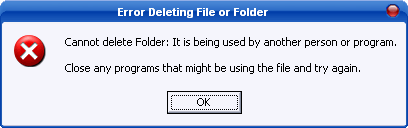
  • Ever had such an annoying message given by Windows?

It has many other flavors:

Cannot delete file: Access is denied
There has been a sharing violation.
The source or destination file may be in use.
The file is in use by another program or user.
Make sure the disk is not full or write-protected and that the file is not currently in use.


General packet radio service (GPRS)

GPRS (General Packet Radio Service) is a very widely-deployed wireless data service, available now with most GSM networks. GPRS offers throughput rates of up to 40 kbps, enabling mobile handsets to access online services at a similar speed to a dial-up modem, but with the convenience of being able to connect from almost anywhere. GPRS […]

GPRS (General Packet Radio Service) is a very widely-deployed wireless data service, available now with most GSM networks.

GPRS offers throughput rates of up to 40 kbps, enabling mobile handsets to access online services at a similar speed to a dial-up modem, but with the convenience of being able to connect from almost anywhere.

GPRS enables people to enjoy advanced, feature-rich data services, such as e-mail on the move, multimedia messages, social networking and location-based services.

General packet radio service (GPRS) is a packet oriented mobile data service on the 2G and 3G cellular communication system’s global system for mobile communications (GSM). GPRS was originally standardized by European Telecommunications Standards Institute (ETSI) in response to the earlier CDPD and i-mode packet-switched cellular technologies. It is now maintained by the 3rd Generation Partnership Project (3GPP).[1][2]

GPRS usage is typically charged based on volume of data transferred, contrasting with circuit switched data, which is usually billed per minute of connection time. 5 GB per month for a fixed fee or on a pay-as-you-use basis. Usage above the bundle cap is either charged per megabyte or disallowed.

GPRS is a best-effort service, implying variable throughput and latency that depend on the number of other users sharing the service concurrently, as opposed to circuit switching, where a certain quality of service (QoS) is guaranteed during the connection. In 2G systems, GPRS provides data rates of 56–114 kbit/second.[3] 2G cellular technology combined with GPRS is sometimes described as 2.5G, that is, a technology between the second (2G) and third (3G) generations of mobile telephony.[4] It provides moderate-speed data transfer, by using unused time division multiple access (TDMA) channels in, for example, the GSM system. GPRS is integrated into GSM Release 97 and newer releases.

finnix

Finnix is a self-contained, bootable Linux CD distribution (“LiveCD”) for system administrators, based on Debian. You can mount and manipulate hard drives and partitions, monitor networks, rebuild boot records, install other operating systems, and much more. Finnix includes the latest technology for system administrators, with Linux kernel 3.0, x86 and PowerPC support, hundreds of sysadmin-geared […]

Finnix is a self-contained, bootable Linux CD distribution (“LiveCD”) for system administrators, based on Debian. You can mount and manipulate hard drives and partitions, monitor networks, rebuild boot records, install other operating systems, and much more. Finnix includes the latest technology for system administrators, with Linux kernel 3.0, x86 and PowerPC support, hundreds of sysadmin-geared packages, and much more. And above all, Finnix is small; currently the entire distribution is over 400MiB, but is dynamically compressed into a small bootable image. Finnix is not intended for the average desktop user, and does not include any desktops, productivity tools, or sound support, in order to keep distribution size low.

Google Nexus

Google Nexus is a line of mobile devices using the Android operating system produced by Google in conjunction with an original equipment manufacturer (OEM) partner. Devices in the Nexus series[1] do not have manufacturer or wireless carrier modifications to Android (such as custom graphical user interfaces), and have an unlockable bootloader[2] to allow further development […]

Google Nexus is a line of mobile devices using the Android operating system produced by Google in conjunction with an original equipment manufacturer (OEM) partner. Devices in the Nexus series[1] do not have manufacturer or wireless carrier modifications to Android (such as custom graphical user interfaces), and have an unlockable bootloader[2] to allow further development and end-user modification.[3] Nexus devices are the first Android devices to receive updates to the operating system.[4][5][6] The Galaxy Nexus is one of the few smartphones recommended by the Android Open Source Project for Android software development.[7] As of November 2012[update], the latest devices in the series are the Nexus 4 phone by Google and LG, and the Nexus 7 and Nexus 10 tablet computers by Google with Asus and Samsung respectively.

Digital Forensics

What is odessa? It’s an acronym for “Open Digital Evidence Search and Seizure Architecture” The intent of this project is to provide a completely open and extensible suite of tools for performing digital evidence analysis as well as a means of generating a usable report detailing the analysis and any findings. The odessa tool suite […]

What is odessa?

It’s an acronym for “Open Digital Evidence Search and Seizure Architecture”
The intent of this project is to provide a completely open and extensible suite of tools for performing digital evidence analysis as well as a means of generating a usable report detailing the analysis and any findings. The odessa tool suite currently represents more than 7 man years of labor, and consists of 3 highly modular cross-platform tools for the acquisition, analysis, and documentation of digital evidence.

In addition to the odessa tool suite, the project hosts other applications and information related to digital forensics. At this time, the list of additional tools includes a set of whitepapers and utilities authored by Keith J. Jones including Galleta, a tool for analyzing Internet Explorer cookies, Pasco, a tool for analyzing the Microsoft Windows index.dat file, and Rifiuti, a tool for investigating the Microsoft Windows recycle bin info2 file.

CAINE (Computer Aided INvestigative Environment) is an Italian GNU/Linux live distribution created as a project of Digital Forensics
Currently the project manager is Nanni Bassetti.
CAINE offers a complete forensic environment that is organized to integrate existing software tools as software modules and to provide a friendly graphical interface.
The main design objectives that CAINE aims to guarantee are the following:

  • an interoperable environment that supports the digital investigator during the four phases of the digital investigation
  • a user friendly graphical interface
  • a semi-automated compilation of the final report

We recommend you to read the page on the CAINE policies carefully.
CAINE represents fully the spirit of the Open Source philosophy, because the project is completely open, everyone could take the legacy of the previous developer or project manager. The distro is open source, the Windows side (Wintaylor) is open source and, the last but not the least, the distro is installable, so giving the opportunity to rebuild it in a new brand version, so giving a long life to this project ….

http://linuxzoo.net/page/tut_caine_lab1.html